Computers & Internet Logo

Related Topics:

Posted on Nov 05, 2010
Answered by a Fixya Expert

Trustworthy Expert Solutions

At Fixya.com, our trusted experts are meticulously vetted and possess extensive experience in their respective fields. Backed by a community of knowledgeable professionals, our platform ensures that the solutions provided are thoroughly researched and validated.

View Our Top Experts

How do i import my bookmarks from firefox to safari

2 Answers

Michael Lei

Level 3:

An expert who has achieved level 3 by getting 1000 points

All-Star:

An expert that got 10 achievements.

MVP:

An expert that got 5 achievements.

Master:

An expert who has achieved Level 3.

  • Master 498 Answers
  • Posted on Jun 25, 2019
Michael Lei
Master
Level 3:

An expert who has achieved level 3 by getting 1000 points

All-Star:

An expert that got 10 achievements.

MVP:

An expert that got 5 achievements.

Master:

An expert who has achieved Level 3.

Joined: Nov 19, 2018
Answers
498
Questions
0
Helped
125262
Points
1736

To transfer bookmarks from Firefox to Safari on Mac OS, the first thing we need to do is export bookmarks from Firefox. Check out the content below to see how to export bookmarks from Firefox to Safari.
Step 1. Export bookmarks from Firefox
1. Launch Firefox and Select Organize Bookmarks.
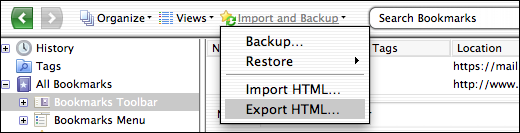
2. When the bookmarks organizer window pops up, click Import and Backup.

3. On the following pop-up, select Export HTML.

4. On the following window, Select a folder to save the bookmarks in and click Save.
Above is the first part, if you want to import bookmarks from Firefox to Safari, there's another thing you need to do.
Step 2. Import Firefox bookmarks to Safari
1. Launch Safari.
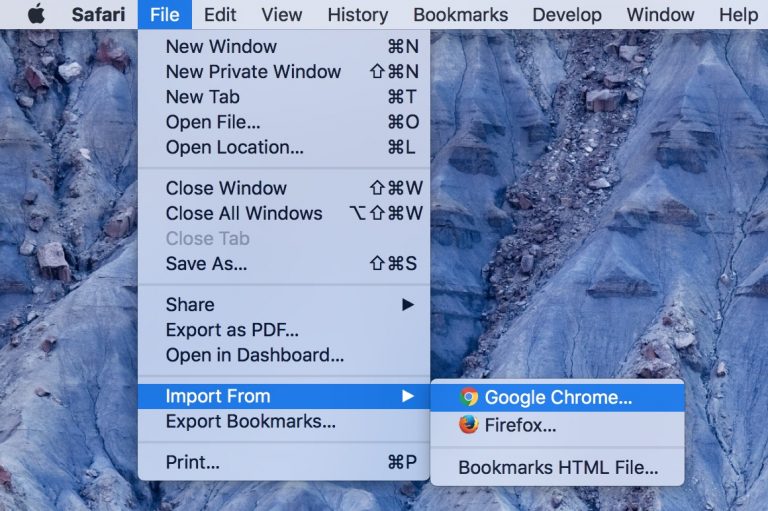
2. On the menu bar, select File>Import From>Bookmarks HTML File, and then select the Firefox bookmarks you just exported.

Note: You can also directly select Google Chrome or Firefox to directly import bookmarks from Firefox to Safari without doing Step 1. But if the Firefox bookmarks you want to import to Safari is on another Mac computer, you'll have to export those Firefox bookmarks first.

For more details, check: How to import bookmarks from Firefox to Safari

Anonymous

Level 1:

An expert who has achieved level 1.

New Friend:

An expert that has 1 follower.

Corporal:

An expert that has over 10 points.

Mayor:

An expert whose answer got voted for 2 times.

  • Contributor 19 Answers
  • Posted on Nov 05, 2010
Anonymous
Contributor
Level 1:

An expert who has achieved level 1.

New Friend:

An expert that has 1 follower.

Corporal:

An expert that has over 10 points.

Mayor:

An expert whose answer got voted for 2 times.

Joined: Sep 18, 2010
Answers
19
Questions
0
Helped
3750
Points
55

Hello. To import your bookmarks from your Firefox browser, choose "organze bookmarks" on the Bookmarks drop down menu at the top part of your firefox browser (or alternatively use ctrl+shift+B). This will open another window labeled "Library"; where all your bookmarks will be shown. From the "import and backup" drop down menu select "export HTML.."; a window pops up that will allow you to export/save your bookmark to a preferred location (Desktop, preferably). After which, open Safari, hit "File" then choose "import bookmarks" and just select the file that you earlier saved.

Ad

Add Your Answer

×

Uploading: 0%

my-video-file.mp4

Complete. Click "Add" to insert your video. Add

×

Loading...
Loading...

107 views

Ask a Question

Usually answered in minutes!

Top Computers & Internet Experts

ADMIN Andrew
ADMIN Andrew

Level 3 Expert

73781 Answers

ADMIN Eric
ADMIN Eric

Level 3 Expert

42220 Answers

Brad Brown

Level 3 Expert

19190 Answers

Are you a Computer and Internet Expert? Answer questions, earn points and help others

Answer questions

Manuals & User Guides

Loading...