
Restore
If you mean reset to factory, go to settings, then general, scroll down to reset at bottom. hope this helps.
Whenever you restore your iPhone or iPod touch, Apple highly recommends that you perform a sync prior to restoring in order to back up any changes since your last sync. If you have movie rentals on the device, see iTunes Store movie rental usage rights in the United States before restoring... sorry, i read restore, and thought reset lets try this again. hope this helps.
Use the following steps to restore your iPhone or iPod touch:Make sure you have the latest version of iTunes installed and running before attempting to update.
Connect your iPhone or iPod touch to your computer.
Select your iPhone or iPod touch when it appears in iTunes under Devices.
Select the Summary tab.
Select the Restore option.
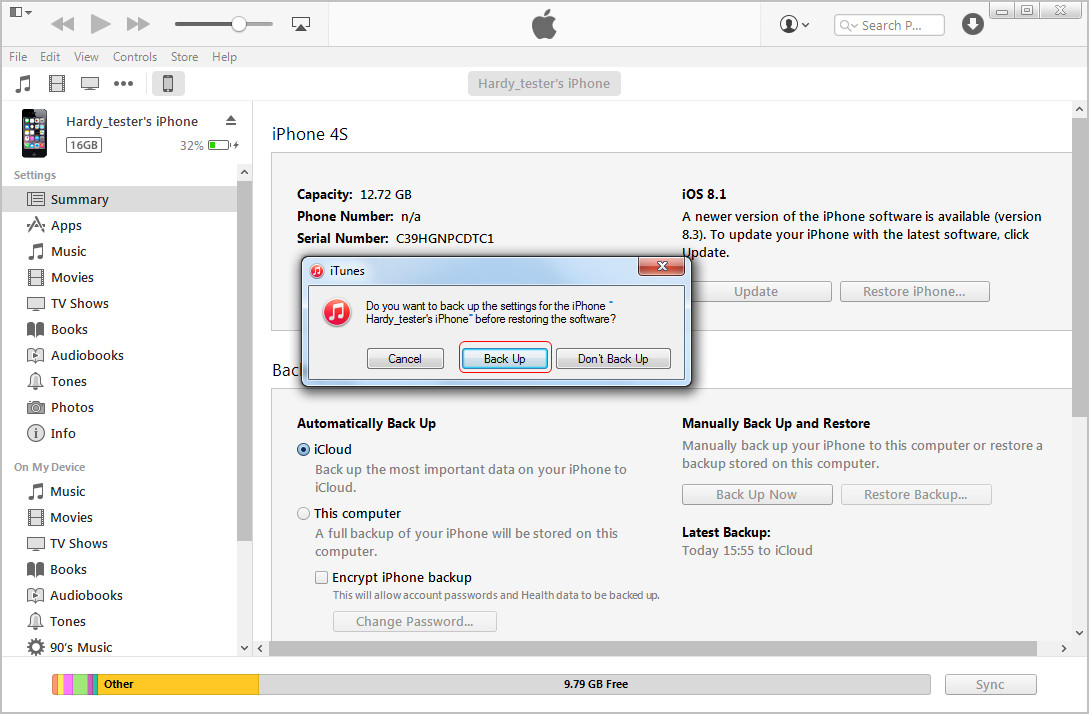
When prompted to back up your iPhone or iPod touch's settings before restoring, select the Back Up option (as seen in the image below). If have just backed up the device, it is not necessary to create another.

×
Find your solution from the list,
Apple Iphone Smartphone
Codes:
Software & Hardware Problems
Find Your Solutions for Apple Products:
Apple Iphone 3G
Apple iPod Touch Digital Media Player
1. Connect iPhone to your computer.
2. In iTunes, select iPhone in the Devices list, then click Summary at the top of the screen.
3. Click "Check for Update." iTunes tells you if there's a newer version of the iPhone software available.
4. Click Restore. Follow the onscreen instructions to complete the restore process. When restoring, it is recommended that you back up iPhone when prompted. When the iPhone software has been restored, you can either set it up as a new iPhone, or restore your music, videos, app data, and other content from a backup.Please also note that Apple representatives can't unlock an iPhone for you without restoring the iPhone, which will erase everything on it.
 For more details, check: How to Restore iPhone 6 Plus to Factory Settings
If I could be of further assistance, let me know. If this helps or solves the issue, please rate it and give a testimonial for my response. Thanks, Joe
387 views
Usually answered in minutes!



×